Description
pfstat is a project made by Daniel Hartmeir to generate graphic statistiques about the network stream through the firewall PF.
- Official website: https://www.benzedrine.ch/pfstat.html
⇒ Environnement:
- OpenBSD :
6.9⇒ 7.1
Installation
Usual: # pkg_add pfstat pfstatd
pfstatd is not essential for a simpliest configuration. It becomes interesting to run with dedicated user.
Configuration
PF
Assuming that the network interface is em0, we need to modify
/etc/pf.conf to add:
set loginterface em0
pfstat
Configure pfstat is not complicated. By installing the package, the
file config is created, as instance on /etc/pfstat.conf.
You need to change the web directory where the future images will be create.
# sed -i -e 's/sis0/em0/g;s/benzedrine.cx/pfstat/g' /etc/pfstat.conf
This change all lines where:
- sis0 interface by em0
- the folder benzedrine.cx by our future directory pfstat.
Next, you need to configure the crontab of root to run pftstat.
*  * * * * -ns /usr/local/bin/pfstat -q -d /var/db/pfstat/pfstat.db
*/15 * * * * -ns /usr/local/bin/pfstat -p -d /var/db/pfstat/pfstat.db
30 0 * * * -ns /usr/local/bin/pfstat -t 30 -d /var/db/pfstat/pfstat.db
- first line executed every minute to analyze the network stream and save on database
- second line generate the images every 15 minutes
- third will delete every data, at 0:30, datas older than thirty days.
⇒ Create the future folder of the database:
# mkdir -p /var/db/pfstat/
Voila: a minimum functional configuration.
Now, we will create a user system, without right, no password to manage both daemon and package.
_pfstat
Create the user _pfstat is usefull to start daemon pfstatd and after to use the binary pfstat:
# useradd -s /sbin/nologin -d /var/db/pfstat  _pfstat
# chown _pfstat /var/db/pfstat
pfstatd
Just enable, set, and active the daemon:
# rcctl enable pfstatd
# rcctl set pfstatd flags -u _pfstat -a 127.0.0.1
# rcctl start pfstatd
We have not set port number; by default is 9999.
Tools, like nc, help to assume service is run correctly, like:
nc localhost 9999 — normally, stats are displayed, line by line;
if not the case, you have one problem…
pfstatd and PF
I strongly encourage you to block into OpenBSD firewall, all connections on the pfstatd service!
A rule like the following should be sufficient:
block drop in on ! lo0 proto tcp to port 9999
pfstat and _pfstat
Now, we need to reconfigure how using pfstat with the user _pfstat.
- First time, we need to comment or delete all writings into the crontab of the root.
- and set that of the user _pfstat :
- create a filenamed crontab4pfstat, with those rules:
*  * * * * -ns /usr/local/bin/pfstat -q -d /var/db/pfstat/pfstat.db -r 127.0.0.1
*/15 * * * * -ns /usr/local/bin/pfstat -p -d /var/db/pfstat/pfstat.db
30 0 * * * -ns /usr/local/bin/pfstat -t 30 -d /var/db/pfstat/pfstat.db
Little explaination:
- option
-rfollowed by the loopback address: to remote the statistics and save them on the database.
Now, add the file content crontab4pfstat into the _pfstat user crontab:
# crontab -u _pfstat crontab4pfstat
Monitoring _pfstat
It exists differents ways to monitoring the _pfstat user activity:
top -U _pfstat:
load averages:  0.05,  0.38,  0.38
56 processes: 54 idle, 2 on processor
CPU0 states:  0.0% user,  0.0% nice,  0.0% sys,  0.0% spin,  0.0% intr,  100% idle
Memory: Real: 84M/5985M act/tot Free: 9778M Cache: 2757M Swap: 0K/32G

  PID USERNAME PRI NICE  SIZE   RES STATE     WAIT      TIME    CPU COMMAND
16833 _pfstat    2    0  700K  984K sleep/6   netcon    0:00  0.00% pfstatd
$ fstat -u _pfstat -n
USER     CMD          PID   FD  DEV      INUM        MODE   R/W    SZ|DV
_pfstat  pfstatd    16833   wd  4,0         2        40755    r      512
_pfstat  pfstatd    16833    0  4,0     27162        20666   rw    2,2
_pfstat  pfstatd    16833    1  4,0     27162        20666   rw    2,2
_pfstat  pfstatd    16833    2  4,0     27162        20666   rw    2,2
_pfstat  pfstatd    16833    3  4,0     27028        20600    r   73,0
_pfstat  pfstatd    16833    4* internet stream tcp 0x0 127.0.0.1:9999

$ ps aux -U _pfstat
USER       PID %CPU %MEM   VSZ   RSS TT  STAT   STARTED       TIME COMMAND
_pfstat  16833  0.0  0.0   700   984 ??  I       1:19AM    0:00.02 /usr/local/bin/pfstatd -u _pfstat -a 127.0.0.1
Those commands confirm that:
- pfstatd is started and managed by the user _pfstat.
- the daemon listen on local interface, on number port 9999, is waiting a connection — on these examples.
Now, configure httpd:
httpd
Start to create the needed folder:
# mkdir -p /var/www/htdocs/pfstat/
Next, add the following directives to the file configuration /etc/httpd.conf,
as:
types {
    include "/usr/share/misc/mime.types"
}

server "pfstat" {
	listen on 127.0.0.1 port 80

	location "/pfstat/" {
		directory auto index
		root "/htdocs/"
	}

}
Check the configuration, and enable and start the service:
# rcctl enable httpd
# httpd -n && rcctl start httpd
Now, we can consult locally, at: http://localhost/pfstat
Voila!
(another time… but it’s not the final time of)
httpd and _pfstat
Add the _pfstat user to the web group and change the user rights on the web directory:
# usermod -G www _pfstat
# chown -R _pfstat:www /var/www/htdocs/pfstat
PFstats
PFstats is my little projet: create a responsive webpage to consult easier the created images by pfstat.
It is designed to analyze hourly, daily, weekly, monthly and even yearly statistics.
- Git depot: https://tildegit.org/hucste/pfstats
- See README.md
- Modified BSD License
Here one screenshot:
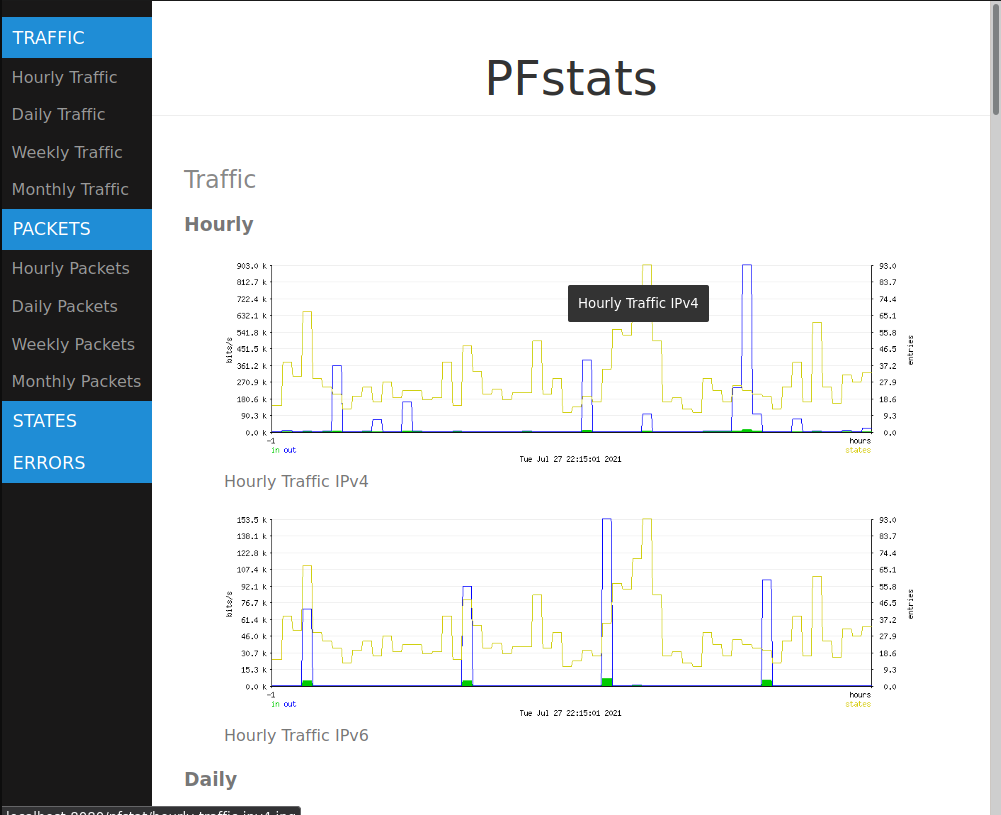
Explainations:
pfstat.conf
⇒ pfstat.conf is configured:
- to analyze IPv4 and IPv6, with the interface em0
- to view the hourly, daily, weekly, monthly graphics
- to publish on web directory:
/var/www/htdocs/pfstat.
You need to copy into /etc.
pfstat.html
Copy all .css, .js and .html files on the web directory.
convert-img.sh
⇒ The shell script transform/convert images JPEG to the Avif and Webp format.
You need to install libavif, and libwebp packages.
Finally:
- add _pfstat user to your user group, and
- chmod needed rights to the script
# usermod -G userid _pfstat
# chmod 0750 /home/userid/folder/pfstats/convert-img.sh
pfstats and crontab
You need to modify the second line on the _pfstat crontab:
15 * * * * -ns /usr/local/bin/pfstat -p -d /var/db/pfstat/pfstat.db; /dir/convert-img.sh
pfstats and httpd
To manage correctly both images format (avif and webp), it may be necessary to slightly modify the configuration of httpd, to add:
image/avif avif
Like:
types {
    include "/usr/share/misc/mime.types"

    image/avif	avif
}
⇒ To check the support of the webp format:
$ grep webp /usr/share/misc/mime.types
image/webp						webp
If the command not display result, we nee to add image/webp webp into
the directive types. Since OpenBSD 6.9, it’s normally not needed!
Troubleshots
ALTQ-style queues not supported anymore
The complete message is:
/etc/pfstat.conf:61: ALTQ-style queues not supported anymore
It seems, by default, that the queues analyze is not possible. Delete or comment all relevent lines.
dbopen: /var/db/pfstat/pfstat.db: No such file or directory
Check if the folder is created!
Voila!
(the final count… is down!
the final countdown!)
Documentations
⇒ Those formats are supported by: